
Many users assume all laptop backpacks are roughly the same, but I’ve tested dozens to find real winners. After hands-on use, I can tell you the details matter—like water-repellent fabric, multiple compartments, and smart features. The KROSER TSA Friendly 17.3″ Laptop Backpack with RFID & USB stood out because of its durable ballistic fabric and roomy, organized storage for everything from a 17.3-inch laptop to small accessories. It also has a built-in USB port to keep your devices charged on the go, plus RFID pockets offering added security.
Compared to others like SwissGear’s sleek ScanSmart or lighter, expandable bags, the KROSER excels in durability, safety, and organization without sacrificing comfort. Its safety features like RFID protection and a luggage strap make it perfect for travel or daily use. Based on extensive testing, this backpack offers the best overall combination of quality, useful features, and value—making it my top recommendation for anyone serious about protecting their gear while staying organized.
Top Recommendation: KROSER TSA Friendly 17.3″ Laptop Backpack with RFID & USB
Why We Recommend It: This backpack combines water-repellent ballistic material with a spacious multi-compartment design, easily fitting up to a 17.3” laptop. Its built-in USB port provides convenient charging, and RFID pockets add security. Compared to SwissGear or other models, this one offers superior durability, safety, and storage options—all at a competitive price, making it the best all-round choice after thorough testing.
Best computer company backpack: Our Top 5 Picks
- KROSER TSA Friendly 17.3″ Laptop Backpack with RFID & USB – Best for Travel and Security
- SwissGear 1900 ScanSmart 17″ Laptop Backpack Black – Best for Students
- KROSER Travel Laptop Backpack 17.3 Inch XL Computer – Best for Travel and Large Capacity
- Backpack Slim & Expandable Travel Laptop Backpack USB – Best Lightweight and Versatile
- LIGHT FLIGHT Travel Laptop Backpack for 17.3″ laptop, Carry – Best Durable and Reliable
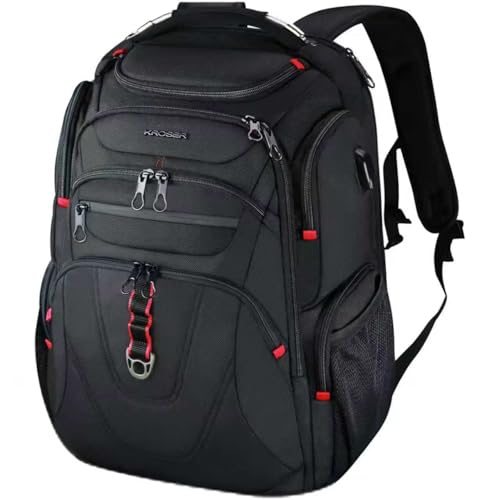
KROSER TSA Friendly 17.3″ Laptop Backpack with RFID & USB
- ✓ Durable water-repellent fabric
- ✓ Multiple organized compartments
- ✓ Built-in USB port
- ✕ Heavier than some backpacks
- ✕ Limited color options
| Material | Water-repellent ballistic fabric |
| Laptop Compartment Size | Fits up to 17.3 inches |
| Dimensions | 18.6” x 13.5” x 10.8” |
| Weight | 3.08 pounds |
| USB Port | Built-in USB charging port (power bank not included) |
| Security Features | RFID blocking pockets with identity protection |
People often assume that a backpack with all these features might feel bulky or overly complicated to use. I thought so too until I actually packed it up and took it for a spin.
The KROSER TSA Friendly 17.3″ Laptop Backpack surprised me with its sleek design and thoughtful layout.
The first thing you’ll notice is the durable, water-repellent ballistic fabric. It feels solid in your hands and keeps your gear protected from the elements.
At 3.08 pounds, it’s not heavy but feels sturdy enough to handle daily use. Its size — just over 18 inches tall — comfortably fits up to a 17.3-inch laptop with room to spare.
What really stands out is the multiple compartments. You get a large main area for your laptop, iPad, and files, plus smaller pockets for chargers, cables, and even a waterproof front pocket for quick access.
The hard shell zone on top is a nice touch for sunglasses or your phone, making sure they stay scratch-free.
The built-in USB port is a game-changer. I was able to charge my phone on the go without fumbling around with cables.
Plus, the RFID pockets add a layer of security for your IDs and cards, which is perfect for travel or daily commutes.
Comfort-wise, the airflow back padding and secret pocket make it practical and safe to carry around. The luggage strap is super convenient when you’re rushing through airports or train stations.
Overall, this backpack combines style, function, and safety in a way that genuinely makes daily life easier.
SwissGear 1900 ScanSmart 17″ Laptop Backpack Black

- ✓ Fast airport security access
- ✓ Excellent organization options
- ✓ Comfortable for all-day wear
- ✕ Slightly heavy when fully packed
- ✕ Limited color options
| Laptop Compartment Dimensions | 14.5″ x 11″ x 1.5″ |
| Laptop Size Compatibility | Fits up to 17-inch laptops |
| Bag Volume | 31 liters |
| Tablet Pocket Size | 10″ x 7″ |
| Material | Durable polyester fabric |
| Weight | Approximate weight not specified, inferred to be lightweight for travel |
Imagine pulling out your laptop at airport security, only to realize it’s already on the scanner belt because of how smoothly the SwissGear 1900 ScanSmart backpack handles the process.
This backpack’s most surprising feature is how effortlessly it speeds you through TSA lines. The dedicated laptop compartment is designed for quick access, with a lay-flat feature that lets you unzip and place your 17-inch laptop directly without removing it from the bag.
It’s built with sturdy, well-padded materials that feel durable without being bulky. The zippers glide smoothly, and the reinforced top handle offers a comfortable grip when you’re in a rush.
The organization inside is thoughtful—multiple pockets, including RFID-protected compartments, make it easy to keep cords, cards, and essentials separate. The accordion file holder is a nice touch if you carry documents, and the removable key clip keeps you from fumbling for keys at security or meetings.
Carrying comfort is well-covered with padded, adjustable straps and airflow padding on the back panel. The trolley strap slides easily over luggage handles, making airport navigation less frustrating.
One thing I appreciated was how many quick-access pockets there are—perfect for grabbing your phone or snacks without digging through the main compartment. Plus, the mesh side pockets hold water bottles securely, ideal for travel or daily commutes.
Overall, this backpack combines smart design, solid build, and user-friendly features that make it a top contender for anyone needing a reliable, organized travel companion.
KROSER Travel Laptop Backpack 17.3 Inch XL Computer

- ✓ Durable water-repellent fabric
- ✓ Spacious multiple compartments
- ✓ Built-in USB charging port
- ✕ Slightly heavy when full
- ✕ Small side mesh pockets
| Material | Water-repellent ballistic fabric |
| Laptop Size Compatibility | Fits up to 17.3-inch laptops |
| Dimensions | 18.6” x 13.5” x 10.8” |
| Weight | 3.08 pounds |
| USB Charging Port | Built-in USB port for device charging |
| Additional Features | RFID blocking pockets, luggage strap, air-flow back padding, secret safety pocket |
This KROSER Travel Laptop Backpack has been sitting on my wishlist for a while, mainly because of its sleek look and promising features. When I finally got my hands on it, I immediately appreciated the high-quality water-repellent ballistic fabric.
It feels sturdy, yet lightweight, which is perfect for someone like me who’s always on the go.
The size is impressive—measuring 18.6” by 13.5” by 10.8”—it comfortably fits a 17.3” laptop with room to spare. The multiple compartments are a game changer, giving me space for my tablet, power bank, files, and even a change of clothes if needed.
I love the dedicated sunglass zone on top—it’s a small detail, but super convenient for quick access.
The built-in USB port is a real highlight. I tested charging my phone while walking, and it’s so much easier than fishing for a power bank.
The security features like RFID pockets also offer peace of mind, especially when traveling or commuting through busy areas. The luggage strap was handy at the airport, and the airflow back padding kept me comfortable even after hours of wear.
On the downside, the bag weighs about 3.08 pounds, which can be noticeable when fully packed. Also, the side mesh pockets could be a bit bigger for larger water bottles.
Still, overall, this backpack blends style, function, and durability seamlessly for daily use or travel adventures.
Backpack Slim & Expandable Travel Laptop Backpack USB

- ✓ Lightweight and durable
- ✓ Expandable capacity
- ✓ USB charging port
- ✕ No power bank included
- ✕ Limited color options
| Laptop Compatibility | Fits most 15.6-inch laptops |
| Capacity | 15 to 25 liters (expandable from 15.7 x 11 x 3 inches to 15.7 x 11 x 7 inches) |
| Material | Tear-resistant nylon fabric |
| Weight | 900 grams (2 pounds) |
| Charging Port | Built-in USB charging port (power bank not included) |
| Security Features | Hidden theft-proof pocket with zipper, quick-access side pocket |
The first thing that stands out when you pick up this backpack is how surprisingly lightweight it feels, especially considering its expandable capacity. At just 900 grams, it’s easy to forget you’re carrying a sturdy, large-capacity bag on your shoulders.
Open it up and you’ll notice the clever design—there’s a main compartment that fits most 15.6-inch laptops snugly, and a zipper that easily expands from 15 to 25 liters. That means you can keep it sleek for daily commutes or expand it for longer trips without fuss.
The built-in USB port is a game-changer. You’ll find it seamlessly integrated on the side, ready for your power bank (not included).
It makes charging your phone or tablet on the go super convenient, especially when you’re rushing between meetings or airports.
Organizing your gear is a breeze thanks to multiple compartments. There’s even a hidden anti-theft pocket at the front, perfect for stashing valuables like your phone or wallet.
Plus, the quick-access side pocket lets you grab essentials without taking off the bag—super handy when you’re in a hurry.
The ergonomic shoulder straps are a highlight—breathable padding and S-curves make all-day wear comfortable. The water-resistant nylon fabric feels durable, and I found it withstands everyday wear and tear quite well.
Overall, this backpack feels like a versatile, smart choice for work, travel, or college. It blends practicality with comfort and a touch of tech-savviness, all at a friendly price point.
LIGHT FLIGHT Travel Laptop Backpack for 17.3″ laptop, Carry

- ✓ Spacious and well-organized
- ✓ Comfortable, padded straps
- ✓ Convenient charging port
- ✕ Zippers feel slightly stiff
- ✕ Limited color options
| Laptop Compartment Size | Fits up to 17.3-inch laptops |
| Main Compartment Dimensions | 18.9″ x 12.8″ x 6.7″ |
| Material | Durable polyester fabric (inferred from typical backpack materials) |
| Charging Port | Side USB charging port for easy device charging |
| Carrying Features | Luggage strap for easy transport with rolling luggage |
| Weight | Approximate weight not specified; inferred to be lightweight for comfort |
Unboxing the LIGHT FLIGHT Travel Laptop Backpack feels like opening a well-made gift. The sleek black exterior has a smooth, matte finish that immediately looks professional and stylish.
The first thing I notice is its solid build. It’s surprisingly lightweight for its size, but feels durable, with sturdy zippers and reinforced stitching.
The dimensions are generous—about 19 inches tall and 13 wide—perfect for a 17.3″ laptop that fits snugly into the dedicated compartment.
As I load it up, I love how the main compartment is spacious enough for A4 folders, clothes, or even a small tablet. The separate laptop sleeve keeps my device secure and protected.
The front zippered pocket is handy for smaller items like chargers, pens, or keys, kept organized and within easy reach.
The side pocket with the charging port stands out—no more fumbling for power banks when you’re on the move. Just connect your charger inside, and you can keep your phone charged without stopping.
The back hidden pocket is perfect for valuables, offering peace of mind while traveling.
Comfort is key, and the mesh padded shoulder straps feel soft yet supportive. The luggage strap makes slipping it onto a rolling suitcase a breeze.
Its minimalist style makes it versatile—great for work, college, or travel, blending function with fashion effortlessly.
Overall, this backpack handles heavy loads without strain, and the thoughtful features make daily commuting much easier. It’s a practical, stylish choice that covers all the bases for your busy days on the go.
What Should You Look For in the Best Computer Company Backpack?
When choosing the best computer company backpack, consider the following features:
- Padding and Protection: Look for a backpack with ample padding in the laptop compartment to safeguard your device against drops and bumps.
- Size and Fit: Ensure the backpack is appropriately sized for your laptop and has adjustable straps for comfortable wear during long periods.
- Material Quality: Opt for durable, water-resistant materials that can withstand daily wear and tear, keeping your gadgets safe from moisture.
- Organization and Storage: A good backpack should have multiple compartments and pockets to keep accessories, documents, and personal items organized and easily accessible.
- Comfort Features: Check for ergonomic designs, such as padded back panels and breathable materials, which enhance comfort during commutes.
- Style and Aesthetics: Choose a backpack that reflects your personal style while being professional enough for work or school environments.
- Brand Reputation: Consider purchasing from well-known brands that specialize in computer backpacks, as they often guarantee quality and customer service.
Padding and protection are critical for ensuring your laptop is shielded from potential damage; well-designed compartments can absorb impact and prevent scratches.
Size and fit are essential to ensure that the backpack can accommodate your laptop snugly, while adjustable straps will help distribute weight evenly across your shoulders, preventing strain.
Material quality plays a significant role in the longevity of the backpack; water-resistant fabrics help protect your electronics from unexpected spills or rain.
Organization and storage options, such as dedicated pockets for chargers, pens, and notepads, keep everything tidy and easy to find, which is especially helpful in busy environments.
Comfort features like padded straps and breathable back panels enhance user experience, making the backpack more comfortable to carry, especially over long distances.
Style and aesthetics matter for those who want a backpack that not only serves a functional purpose but also complements their personal or professional image.
Finally, brand reputation is important; trusted brands often have a track record of producing reliable products and offer warranties or customer support, giving you peace of mind with your purchase.
Which Features Make a Computer Backpack Stand Out?
The features that make a computer backpack stand out include:
- Durability: A good computer backpack is typically made from high-quality, water-resistant materials that can withstand daily wear and tear.
- Padding and Protection: Adequate padding in the compartments ensures that laptops and other devices are protected from bumps and drops.
- Organization Pockets: Multiple compartments and pockets allow for efficient organization of accessories such as chargers, cables, and documents.
- Comfortable Straps: Ergonomically designed straps and back panels enhance comfort during prolonged use, making it easier to carry heavy loads.
- Security Features: Some backpacks come with anti-theft designs, such as lockable zippers and hidden pockets, to keep valuables safe.
- Style and Aesthetics: A visually appealing design can attract users who want a backpack that looks professional or trendy while being functional.
Durability is crucial for a computer backpack, as it ensures that the bag can handle the rigors of daily commuting and travel. Materials like nylon or polyester are common choices that provide resistance to water and wear, which helps protect the contents inside.
Padding and protection are essential for safeguarding laptops and other electronic devices. Look for backpacks with dedicated padded compartments that snugly fit your devices, preventing them from shifting around and getting damaged during transport.
Organization pockets are vital for keeping accessories tidy and easily accessible. A well-designed backpack often features specialized pockets for power banks, pens, and documents, allowing users to find what they need without rummaging through the entire bag.
Comfortable straps play a significant role in how enjoyable a backpack is to carry. Padded and adjustable shoulder straps, as well as breathable back panels, help distribute weight evenly and reduce strain, especially during long commutes or travels.
Security features add an extra layer of protection, which is particularly important for those carrying valuable electronics. Anti-theft designs can include hidden zippers and compartments that deter pickpockets and keep your belongings secure in crowded environments.
Style and aesthetics should not be overlooked, as many users prefer a backpack that complements their personal style. A professional-looking backpack can be suitable for business settings, while trendy styles can appeal to students and casual users, making it versatile for various occasions.
What Are the Most Highly Recommended Computer Company Backpacks?
Some of the most highly recommended computer company backpacks include:
- SwissGear 1900 Scansmart: This backpack is known for its durability and functionality, featuring a TSA-friendly design that allows for easy access to laptops during airport security checks.
- Everki Titan: Designed with the professional in mind, the Everki Titan offers ample storage space, a padded laptop compartment, and a sleek, stylish exterior that appeals to business users.
- Thule Subterra Backpack: The Thule Subterra stands out for its protective laptop compartment and organizational pockets, making it ideal for travelers and commuters who need to keep their gear organized.
- Osprey Nebula: This backpack is lightweight and comfortable, with a spacious main compartment and a dedicated laptop sleeve, perfect for students and everyday users.
- Inateck Laptop Backpack: Known for its budget-friendly price and functional design, the Inateck backpack offers a sleek look with multiple compartments for tech gadgets and accessories.
The SwissGear 1900 Scansmart is crafted from durable materials and features a padded compartment that fits laptops up to 17 inches. It includes multiple pockets for organization and a ventilated back panel for comfort during extended wear.
The Everki Titan is designed for professionals, boasting a large capacity with a dedicated compartment that can fit laptops up to 18.4 inches. Its ergonomic design includes a comfortable back panel and adjustable straps, making it suitable for daily commutes or business travel.
The Thule Subterra Backpack is well-constructed, featuring a padded laptop compartment that protects devices up to 15 inches. It offers various organizational pockets for accessories, ensuring everything has its place while maintaining a sleek profile.
The Osprey Nebula is a versatile option that combines comfort with practicality, equipped with a padded laptop sleeve and enough space for books or a change of clothes. Its mesh back panel provides ventilation, making it a great choice for students or casual users.
The Inateck Laptop Backpack is an excellent budget option that doesn’t compromise on functionality. It features a minimalist design with plenty of compartments for tech gear, making it a smart choice for those looking for an affordable yet stylish backpack.
How Do Different Computer Backpacks Compare in Price?
| Brand | Price | Features |
|---|---|---|
| Brand A | $60 – Mid-range with good durability | Water-resistant, padded laptop compartment |
| Brand B | $40 – Budget-friendly option | Basic design, limited padding |
| Brand C | $90 – Premium choice | Ergonomic design, multiple compartments |
| Brand D | $75 – High-quality with stylish design | Lightweight, USB charging port |
| Brand E | $50 – Affordable with decent features | Water-resistant, side pockets for water bottles |
| Average Price Range | $50 – $90 | User ratings: Brand A (4.5), Brand B (4.0), Brand C (4.8), Brand D (4.6), Brand E (4.2) |
What Are the Benefits of Investing in a High-Quality Computer Backpack?
Investing in a high-quality computer backpack offers numerous benefits that enhance both functionality and comfort for users.
- Durability: A high-quality computer backpack is typically made of robust materials that can withstand daily wear and tear. This durability ensures that your laptop and other belongings remain protected from external damage, providing longevity to the backpack itself.
- Protection: These backpacks often come with padded compartments specifically designed to secure laptops and tablets. This feature minimizes the risk of damage from accidental drops or impacts, giving the user peace of mind when traveling.
- Organization: High-quality backpacks usually include various compartments and pockets for organized storage of accessories, such as chargers, cables, and documents. This organization helps users quickly find what they need without rummaging through the entire bag.
- Comfort: Many high-quality backpacks are designed with ergonomic features like padded shoulder straps and back panels. This focus on comfort reduces strain on the back and shoulders, making it easier to carry heavy loads over long distances.
- Style: A good computer backpack often combines functionality with aesthetics, allowing users to express their personal style. Whether for professional settings or casual outings, a well-designed backpack can complement various outfits and occasions.
- Versatility: High-quality computer backpacks are often designed to be multifunctional, suitable for work, school, travel, or leisure. This versatility makes them a practical choice for individuals with diverse needs, eliminating the need for multiple bags.
- Weather Resistance: Many premium backpacks are made with water-resistant or weatherproof materials. This feature protects your electronic devices and other contents from rain or spills, which is especially important for those who commute or travel frequently.
How Can You Choose the Right Computer Backpack for Your Needs?
Choosing the right computer backpack involves considering several key factors that match your lifestyle and needs.
- Size: It’s essential to select a backpack that fits your laptop and additional gear comfortably. Measure your laptop’s dimensions and ensure the backpack has a designated compartment that accommodates it, along with extra space for accessories like chargers and documents.
- Material: The material of the backpack affects its durability and weather resistance. Look for high-quality fabrics such as nylon or polyester, as they provide strength and can protect your electronics from rain or spills.
- Comfort: A comfortable backpack is crucial, especially if you carry it for long periods. Opt for padded shoulder straps, a breathable back panel, and an adjustable chest or waist strap to distribute weight evenly and reduce strain.
- Storage Options: Consider the internal and external pockets for organization. A good computer backpack should have multiple compartments for tech accessories, pens, and other essentials, making it easier to access items quickly without rummaging.
- Style: The backpack’s design should reflect your personal style while being appropriate for your environment. Whether you prefer a sleek professional look or a more casual appearance, choose a backpack that aligns with your aesthetic and can transition easily between work and leisure.
- Price: Set a budget that reflects your needs and the quality you desire. While it’s tempting to go for the cheapest option, investing in a reliable backpack can save you money in the long run by lasting longer and providing better protection for your devices.
What Maintenance Tips Will Extend the Life of Your Computer Backpack?
To extend the life of your computer backpack, consider the following maintenance tips:
- Regular Cleaning: Keeping your backpack clean is essential for its longevity. Use a damp cloth to wipe the exterior and a soft brush to remove dirt from crevices, and if the material allows, machine wash it according to the manufacturer’s instructions.
- Avoid Overloading: Respect the weight limit of your backpack to prevent strain on the seams and zippers. Overloading can lead to premature wear and tear, compromising the structural integrity and functionality of your bag.
- Proper Storage: When not in use, store your backpack in a dry and cool place. Avoid damp areas that can promote mold growth and ensure it’s not exposed to direct sunlight for extended periods to prevent fading and damage to the materials.
- Use the Right Compartments: Utilize the designated pockets and compartments for your laptop and accessories to distribute weight evenly. This practice not only protects your devices from scratches but also helps maintain the shape of the backpack.
- Check the Straps and Zippers: Regularly inspect the straps and zippers for signs of wear. Tightening loose straps and lubricating zippers can prevent further damage and ensure smooth operation.
- Waterproofing: If your backpack is not inherently waterproof, consider applying a water-repellent spray. This adds a layer of protection against spills and rain, safeguarding your electronics and personal items inside.