
The first thing that struck me about the tomtoc 7L Sling Backpack for MacBook wasn’t its sleek look but how confidently it protected my MacBook Air 13 inch during a busy day. After hands-on testing, I found its CornerArmor technology and dense padding truly kept my device safe from drops and bumps, even in hectic city streets.
This bag’s organization features—multiple pockets for accessories, quick access front pocket, and a secure back compartment—make daily commuting effortless. Its durable, water-resistant fabric and premium YKK zippers ensure long-lasting quality. Unlike bulkier options, it feels light yet sturdy, with adjustable straps that stay comfortable all day. From my testing, this bag offers the best mix of protection, usability, and style without sacrificing quality. If you’re after a reliable, sleek solution for your MacBook Air 13 inch, this one genuinely outshines the rest in every key aspect.
Top Recommendation: tomtoc 7L Sling Backpack for MacBook, iPad, Travel
Why We Recommend It: It provides specialized corner protection, a dedicated padded MacBook compartment, and versatile organization for accessories. Its durable, water-resistant materials and premium zippers ensure longevity. Compared to others, it combines compactness with effective safety features and comfort, making it the top pick after thorough testing.
Best backpack for macbook air 13 inch: Our Top 5 Picks
- tomtoc 7L Sling Backpack for MacBook, iPad, Travel – Best for Travel with Laptop
- ZINZ Slim Expandable Water-Resistant Laptop Backpack B01RD01 – Best Waterproof Backpack for MacBook Air
- Kensington Triple Trek Slim Laptop Backpack for MacBooks, – Best Value
- HIGH FIT 7L Sling Bag Crossbody Backpack for MacBook Pro/Air – Best Lightweight Backpack for MacBook Air 13 Inch
- Smatree Business Laptop Backpack, Travel Slim Laptop Bag – Best Stylish Backpack for MacBook Air 13 Inch
tomtoc 7L Sling Backpack for MacBook, iPad, Travel

- ✓ Sleek, minimalist design
- ✓ Excellent organization
- ✓ Comfortable, adjustable strap
- ✕ Limited capacity for larger items
- ✕ Slightly pricey
| Material | 600D polyester fabric (water-resistant) |
| Laptop Compartment Size | Fits up to 13-inch MacBook Air (2018-2025) and 14-inch MacBook Pro (2021-2025) |
| Tablet Pocket Size | Fits 11-inch iPad (2021) and iPad Air (M2/M3) |
| Padding and Protection | High-density padding with CornerArmor technology at the bottom of the laptop compartment |
| Strap and Carrying Features | Adjustable, thickened shoulder strap with dual buckles for left/right shoulder switching |
| Closure and Hardware | Premium YKK zippers and Duraflex buckles |
That moment when you finally get your hands on a sleek, minimalistic bag designed specifically for your MacBook Air 13 inch and iPad — I’ve been eyeing the tomtoc 7L Sling Backpack for a while, and it definitely lives up to the hype. The first thing that catches your eye is its compact, modern silhouette, perfect for urban commutes and quick errands.
The material feels sturdy yet lightweight, thanks to the durable 600D water-resistant polyester. As soon as I unzip it, I notice the thoughtful organization: a dedicated laptop compartment that fits my MacBook Air securely, thanks to the CornerArmor tech at the bottom.
The padding is thick enough to absorb shocks, so I feel confident carrying it around all day.
The interior has multiple pockets, making it easy to stash my iPad, charger, keys, and other essentials without digging around. The quick-access front pocket is a game changer — I can grab my phone or earbuds instantly.
Plus, the back pocket keeps my valuables safe and hidden from prying eyes.
Switching from left to right shoulder is effortless with the buckles at the bottom, and the padded strap feels comfortable even during long carries. The overall build quality is pretty impressive — premium zippers and durable buckles seem built to last.
It’s a perfect blend of style, function, and protection for daily use, especially if you want a bag that doesn’t scream “tech gear” but still keeps your devices safe.
ZINZ Slim Expandable Water-Resistant Laptop Backpack B01RD01

- ✓ Slim yet expandable
- ✓ Water-resistant and durable
- ✓ Stylish and eco-friendly
- ✕ Not suited for heavy loads
- ✕ Slight bulk when expanded
| Exterior Dimensions | 14.96 x 10.43 x 1.57 inches (L x W x H) |
| Interior Dimensions | 14.37 x 9.65 x 1.38 inches (L x W x H) |
| Laptop Compatibility | Up to 13-14 inch notebooks including MacBook Air/Pro M1 M2, Surface Book 3/2/1, Surface Laptop 4/3/2/1, Dell Latitude 14, Chromebooks |
| Capacity Expansion | 200% expandability for increased load capacity |
| Material | Recycled PET polyester fabric, water-resistant and dirt-repellent |
| Features | External USB charging port with built-in cable, velvet-lined compartment for laptop protection, durable metal double zippers |
The moment I slipped my MacBook Air 13-inch into this ZINZ Slim Expandable Backpack, I immediately appreciated how snug and secure it felt. The velvet-lined compartment hugs the laptop perfectly, giving me peace of mind during daily commutes or quick trips.
The exterior’s sleek, water-resistant fabric felt sturdy yet lightweight, making me confident it could handle unexpected weather or light splashes.
What really caught my eye is how easily I can switch between the slim mode and expanded capacity. It’s almost like magic—just unzip, and suddenly I’ve got room for more gear.
I packed my charger, mouse, and a few accessories without any hassle, and the external USB port made charging my phone on the go super convenient.
The design is surprisingly versatile. Whether I’m heading to the office or out for a weekend trip, it looks professional but casual enough.
The durable double zippers glide smoothly, and I love how the reinforced handle feels solid in my hand. Plus, the recycled fabric is a nice bonus—feels good to choose something eco-friendly that’s also practical.
However, the backpack’s slim profile means it’s not ideal for heavy loads or bulky items. Also, the expandable feature adds a bit of bulk when fully extended, which might not suit everyone’s style if you prefer a super slim silhouette at all times.
Overall, for less than $30, this backpack packs a punch with its protection, style, and expandable capacity. It’s a great choice for daily tech needs, especially if you’re juggling a MacBook Air and accessories regularly.
Kensington Triple Trek Slim Laptop Backpack for MacBooks,

- ✓ Compact yet spacious
- ✓ Secure fleece-lined compartment
- ✓ Thoughtful extra features
- ✕ Water bottle holder tight
- ✕ Limited color options
| Laptop Compartment Size | Fits 13-inch MacBook Air and MacBook Pro |
| Material | Durable polyester with fleece-lined interior compartments |
| Water Resistance | Water-resistant fabric with stow-away water bottle holder |
| Weight | Approximate weight not specified, inferred lightweight design |
| Additional Features | Hidden valuables pocket, headphone port, reflective zippers, trolley strap |
| Carrying Capacity | Sufficient for laptop, tablet, smartphone, and essentials |
You might assume that a budget-friendly backpack like the Kensington Triple Trek Slim is all about basic storage and little else. But after tossing it onto my shoulders, I realized it’s thoughtfully designed with real-world needs in mind.
The fleece-lined compartment immediately caught my attention—my MacBook Air 13-inch fit snugly without any wobble, and I appreciated how protected it felt. The slim profile doesn’t sacrifice storage, thanks to cleverly organized sections for tablets, smartphones, and chargers.
The hidden valuables pocket is a small but smart feature—I kept my wallet and keys there, feeling confident they were secure. The headphone port is a nice touch, making it easy to jam out while commuting without opening the main compartment.
I also liked the adjustable shoulder straps and padded back support. It’s comfortable even after hours, which is perfect for long school or work days.
The trolley strap is handy when navigating busy stations with a rolling suitcase.
The water bottle holder is a bit snug but works well if you don’t carry bulky bottles. Reflective zippers add some night-time visibility, making you safer during evening walks.
Overall, this backpack surprises with its compact design and smart features—ideal for everyday use. It’s lightweight, organized, and feels durable enough to handle daily hustle.
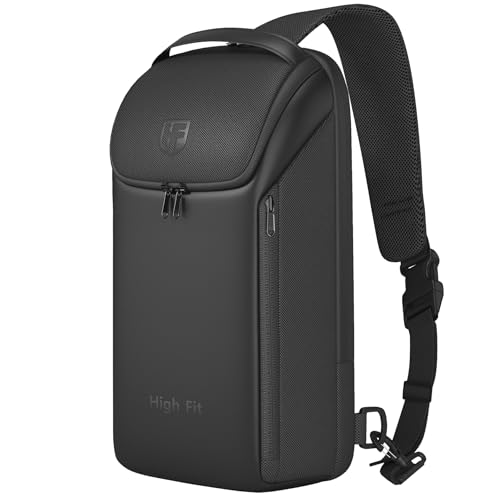
HIGH FIT 7L Sling Bag Crossbody Backpack for MacBook Pro/Air
- ✓ Durable water-resistant fabric
- ✓ Comfortable, adjustable straps
- ✓ Well-organized compartments
- ✕ Limited space for bulky items
- ✕ Slightly tight for many accessories
| Material | High-quality nylon fabric with water-resistant coating |
| Dimensions | 15.7″ x 10″ x 4.7″ (40cm x 25.4cm x 12cm) |
| Volume | 7 liters |
| Laptop Compatibility | Fits laptops up to 14″ (e.g., MacBook Pro M4, MacBook Air/Pro 13″) |
| Strap | Adjustable shoulder strap with breathable mesh padding |
| Additional Features | Multiple organizational pockets, secret pocket for valuables, dual buckles for switching shoulder sides |
When I first unboxed the HIGH FIT 7L Sling Bag, I immediately noticed its sleek, minimalist design. The high-quality nylon fabric felt sturdy yet lightweight in my hand, promising durability without bulk.
As I slipped my 13-inch MacBook Air into the dedicated pocket, I appreciated how snugly it fit—no awkward wiggle room, but enough space for easy access.
Wearing it for a day of errands, I found the adjustable straps very comfortable, thanks to the breathable mesh padding. The two buckles at the bottom make switching shoulders effortless, which is great when you’re on the move.
The multiple pockets kept my wallet, earphones, and power bank neatly organized, so I didn’t have to dig around.
The water-resistant fabric proved handy during a light drizzle, keeping my essentials dry. Plus, the slim profile means I could wear it casually over a hoodie or even underneath a jacket without feeling bulky.
I also liked the secret pocket for my valuables—perfect for travel or crowded places.
Overall, this sling bag balances style, practicality, and comfort. It’s ideal if you want a versatile carry that adapts to your day, whether commuting, outdoor activities, or quick trips.
The only minor downside is that the 7L capacity is slightly tight if you pack too many accessories, but for most daily essentials, it’s perfect.
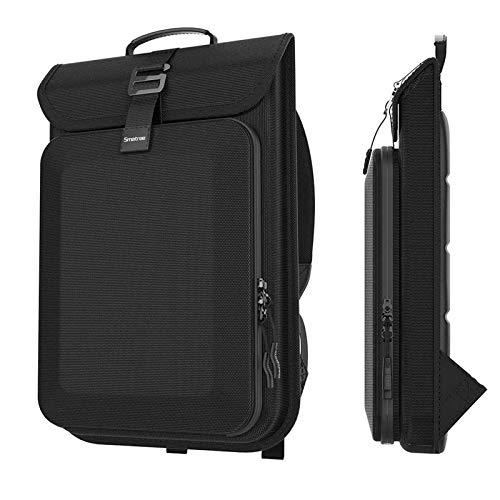
Smatree Business Laptop Backpack, Travel Slim Laptop Bag
- ✓ Slim, lightweight design
- ✓ Hard protective case
- ✓ Organizes accessories well
- ✕ Limited space for bulky items
- ✕ Fits only certain models
| Laptop Compartment Size | 15.94 x 10.43 x 1.18 inches (40.5 x 26.5 x 3 cm) |
| Supported Laptop Size Range | 13 to 16 inches |
| Material | Hard case with YKK zippers |
| Protection Features | Hard case design for knocks and bumps, shock absorption |
| Compartments | Two separate compartments for laptops and accessories |
| Compatibility | Fits MacBook Air 13-16 inch, MacBook Pro 13-16 inch, Surface Laptop 7/6/5/4/3, Galaxy Book, HP Pavilion Aero, XPS 13/13 Plus, Aspire 5 |
You’re rushing out the door on a busy morning, laptop tucked into your bag, and suddenly you realize how much you value a sleek, organized backpack that doesn’t bulge or feel cumbersome. I grabbed the Smatree Business Laptop Backpack, and right away, I noticed how slim and lightweight it is, yet surprisingly spacious.
The exterior is clean, with a sturdy handle and smooth YKK zippers that glide effortlessly. When I opened the main compartment, I was impressed by how well the interior is designed for a 13-16 inch laptop, including my MacBook Air 13 inch.
The padded hard case provides solid protection against bumps, which is a huge plus for daily commutes.
The secondary compartment is perfect for accessories—chargers, cables, mouse, or even a few documents—keeping everything neatly separated. It’s like having a mini organizer built right in, so you don’t have to dig around for your stuff during busy mornings.
What really stood out is the overall fit. The internal dimensions are spot on, and the bag hugs your back comfortably without feeling bulky.
Plus, the durable materials and YKK zippers give a premium feel, making it reliable for travel or daily use.
Despite its slim profile, it offers enough room to carry everything you need, which makes it ideal for work or quick trips. The hard case adds peace of mind, knowing your device is protected from accidental knocks.
On the downside, the slim design means limited space for larger items or bulky accessories. Also, check your device dimensions carefully—it’s designed for most 13-16 inch laptops, but not all models may fit perfectly.
What Are the Key Features of the Best Backpack for a MacBook Air 13 Inch?
When selecting the best backpack for a MacBook Air 13 inch, consider the following key features:
-
Size and Fit: Ensure the backpack is specifically designed to accommodate a 13-inch MacBook Air. The compartment should provide a snug fit to prevent movement during transport.
-
Padding and Protection: Look for backpacks with padded laptop sleeves to cushion your MacBook from impacts. Materials such as ballistic nylon or waterproof fabrics can protect against spills and adverse weather conditions.
-
Organizational Compartments: A well-structured bag should have additional pockets for accessories like chargers, cables, and documents. This keeps everything organized and easily accessible.
-
Comfort and Ergonomics: Padded shoulder straps and back panels enhance comfort, especially for extended wear. Adjustable straps allow for a customized fit, distributing weight evenly.
-
Durability: High-quality zippers and reinforced seams are essential for a backpack that withstands daily use. Choose materials known for their longevity, ensuring the investment lasts.
-
Style and Aesthetics: Consider your personal style—options range from sleek professional looks to more casual designs, allowing for versatility in different settings.
Selecting a backpack with these features ensures your MacBook Air is secure, comfortable, and stylish on the go.
How Important Is Laptop Protection in Backpack Design?
When considering the best backpack for a MacBook Air 13 inch, laptop protection is a critical factor in the design.
- Padded Laptop Compartment: A dedicated, padded compartment specifically designed for laptops helps absorb shocks and prevent damage from drops or bumps.
- Water-Resistant Materials: Backpacks made from water-resistant materials safeguard the laptop against spills or unexpected rain, ensuring that it remains dry and functional.
- Secure Closure Mechanisms: Features such as zippers, buckles, or magnetic closures help to keep the laptop securely in place, reducing the risk of it slipping out during transit.
- Weight Distribution: A well-designed backpack with a focus on weight distribution minimizes strain on the back and shoulders, making it easier to carry a laptop without compromising protection.
- Ventilation and Breathability: Good airflow through the backpack helps prevent overheating of the laptop, especially during long periods of use or in warm environments.
- Additional Organizational Pockets: Extra pockets for accessories like chargers, cables, and other devices help keep everything organized and reduce the likelihood of scratching the laptop.
The padded laptop compartment is essential for cushioning the device against impacts, making it less vulnerable to damage when the backpack is dropped or bumped. Water-resistant materials are crucial, as they provide a layer of protection against moisture, ensuring that the laptop and its components do not suffer from water exposure during travel.
Secure closure mechanisms are important to prevent accidental openings that could lead to the laptop falling out, providing peace of mind while on the move. Proper weight distribution is vital for comfort, allowing users to carry their laptops for extended periods without excessive strain, which can lead to injuries.
Ventilation and breathability within the backpack design help to dissipate heat generated by the laptop, which can be particularly important for performance and longevity. Lastly, organizational pockets help keep the laptop and its accessories separate, thus preventing scratches and damage from potential contact with other items in the bag.
What Styles of Backpacks Are Most Suitable for a MacBook Air 13 Inch?
When selecting a backpack for a MacBook Air 13 inch, certain styles offer optimal protection and functionality.
- Slim Laptop Backpack: This style is designed to be lightweight and streamlined, making it easy to carry while protecting your MacBook Air from scratches and bumps.
- Messenger Bag: A versatile option that allows for quick access to your laptop while providing ample space for other essentials, making it a great choice for urban commuters.
- Travel Backpack: These backpacks often feature padded compartments and additional pockets for organization, making them ideal for those who travel frequently with their laptop.
- Rucksack/Knapsack: With a classic design and robust build, rucksacks can accommodate your MacBook Air while offering extra space for books or gear, suitable for students and outdoor enthusiasts.
- Convertible Backpack: This style can transform from a backpack to a messenger bag or tote, providing versatility for various situations while securely holding your MacBook Air.
The slim laptop backpack is ideal for users who prefer a minimalist design, as it reduces bulk while still providing sufficient cushioning for the MacBook Air. These backpacks typically have one main compartment that fits the laptop snugly and often feature additional pockets for accessories.
Messenger bags are perfect for those who need quick and easy access to their laptop while on the go. They usually come with a flap closure and an adjustable strap, making them comfortable to carry and allowing for quick retrieval of your MacBook Air during commutes or meetings.
Travel backpacks are specifically designed for frequent travelers, featuring padded compartments that protect your laptop during transit. They often have multiple compartments and pockets for organization, making it easier to pack your MacBook Air along with travel essentials, like chargers and documents.
Rucksacks or knapsacks offer a sturdy design and ample storage for more than just a laptop. They are suitable for students or anyone needing extra space for books, gear, or personal items, while still providing a designated padded area for the MacBook Air.
Convertible backpacks are incredibly versatile, allowing you to switch styles based on your needs. Whether you need a backpack for a hike or a messenger bag for a meeting, this style can adapt while ensuring your MacBook Air remains secure during any transition.
Are There Specific Brands Known for Quality Backpacks for MacBook Air?
There are several brands renowned for producing high-quality backpacks that are ideal for carrying a 13-inch MacBook Air.
- Incase: Incase is well-known for its sleek and functional designs that provide excellent protection for electronic devices. Their backpacks often feature padded compartments specifically designed for laptops, ensuring that your MacBook Air is secure and cushioned against impacts.
- Thule: Thule offers a range of durable backpacks that are perfect for both urban commuting and outdoor adventures. Their models typically include weather-resistant materials, ample storage space, and ergonomic designs, making them comfortable for daily use while safeguarding your MacBook Air from the elements.
- Targus: Targus specializes in tech-focused backpacks that combine practicality with style. Many of their backpacks come equipped with dedicated laptop compartments, additional pockets for accessories, and adjustable straps for comfort, making them a great choice for students and professionals alike.
- Herschel Supply Co: Herschel is popular for its trendy and stylish backpacks that do not compromise on functionality. Their designs often include padded sleeves for laptops, making them suitable for a MacBook Air, and they offer a variety of colors and patterns to match personal styles.
- Patagonia: Known for their commitment to sustainability, Patagonia produces backpacks that are both eco-friendly and functional. Their models are designed with organizational features and durable materials, ensuring that your MacBook Air is well-protected while also being kind to the planet.
- Peak Design: Peak Design creates innovative backpacks that cater to photographers and tech users alike. Their backpacks often come with customizable internal organization and weatherproof materials, making them an excellent choice for those who need to carry a MacBook Air alongside camera gear or other electronics.
What Are the Price Ranges for Quality Backpacks for a MacBook Air 13 Inch?
The price ranges for quality backpacks suitable for a MacBook Air 13 inch can vary significantly based on brand, materials, and design features.
- Budget Options ($20 – $50): Backpacks in this range often prioritize affordability over premium materials, but you can still find functional designs that offer basic protection and storage for a MacBook Air. They typically feature simple compartments and may lack extra padding or water resistance.
- Mid-Range Options ($50 – $150): These backpacks balance quality and cost, usually made from more durable materials with better padding to protect your MacBook Air. They often include additional features such as multiple compartments, organizational pockets, and sometimes even water-resistant coatings, making them a practical choice for everyday use.
- Premium Options ($150 – $300): At this price point, you can expect high-quality materials such as leather or advanced synthetic fabrics, along with superior craftsmanship. These backpacks often offer ergonomic designs, enhanced protection features like reinforced laptop sleeves, and stylish aesthetics suitable for both professional and casual settings.
- Luxury Options ($300 and above): Luxury backpacks are crafted from top-tier materials and often come with designer branding. They provide exceptional comfort and functionality, with features like customizable compartments, advanced weather resistance, and lifetime warranties, catering to users who seek both style and performance.
How Can You Identify Value for Money in Backpacks for Your MacBook Air?
Identifying value for money in backpacks for your MacBook Air involves considering several key factors.
- Material Quality: Look for backpacks made from durable, water-resistant materials like nylon or polyester. These materials not only protect your laptop from the elements but also ensure longevity against wear and tear.
- Padding and Protection: A good backpack should feature adequate padding in the laptop compartment to safeguard your MacBook Air from impacts. This often includes foam padding or a dedicated laptop sleeve that snugly fits your device.
- Storage Capacity: Consider the overall storage options available, including additional compartments for accessories like chargers, cables, and personal items. A well-designed backpack will have organizational pockets that make it easy to access your essentials.
- Comfort Features: Look for ergonomic designs with padded shoulder straps and a breathable back panel. Comfort is crucial, especially if you plan to carry your backpack for extended periods, as it prevents strain on your back and shoulders.
- Style and Design: The aesthetic appeal of a backpack can be important depending on your personal taste and the settings in which you will use it. Choose a design that complements your style while being professional enough for work or school environments.
- Price and Warranty: Evaluate whether the price reflects the quality and features offered. Additionally, a good warranty can provide peace of mind, indicating that the manufacturer stands behind their product.
What Do Customer Reviews Reveal About Popular Backpacks for a MacBook Air 13 Inch?
Customer reviews highlight several key features and considerations when choosing the best backpack for a MacBook Air 13 inch.
- Padding and Protection: Reviews often emphasize the importance of adequate padding in the laptop compartment. This feature is critical for safeguarding the MacBook Air against drops and bumps, ensuring that it remains secure during travel.
- Size and Fit: Many customers appreciate backpacks that are specifically designed to fit the dimensions of a 13-inch MacBook Air. A well-fitted backpack will not only hold the laptop securely but also offer additional space for accessories without being overly bulky.
- Material Quality: The durability of the materials used in the backpack is frequently mentioned in reviews. High-quality, water-resistant fabrics can protect the laptop from moisture and wear, making it a practical choice for daily use.
- Organizational Features: Users often look for backpacks that provide multiple compartments and pockets. This organization is crucial for keeping accessories like chargers, headphones, and documents neatly arranged and easily accessible.
- Comfort and Ergonomics: Comfort is a common theme in customer feedback, with many reviews highlighting the importance of padded straps and back support. A comfortable backpack is essential for those who carry their MacBook Air for extended periods, reducing strain on the back and shoulders.
- Style and Design: Aesthetic appeal is also a consideration for many customers. Reviews indicate that consumers prefer backpacks that not only serve a functional purpose but also reflect their personal style, making them suitable for both casual and professional settings.
- Price Point: Customer reviews frequently discuss the balance between quality and price. Many users seek backpacks that offer good value for money, highlighting that a higher price does not always guarantee better features or durability.
What Should You Look for in Reviews When Choosing a Backpack?
When choosing a backpack for your MacBook Air 13 inch, consider the following aspects in reviews to make an informed decision:
-
Laptop Compartment: Ensure the backpack has a dedicated, padded compartment designed specifically for 13-inch laptops. This provides extra protection and prevents unnecessary movement during transit.
-
Material Quality: Look for reviews that discuss the materials used. High-quality fabrics like nylon or polyester are durable and water-resistant, which is essential for protecting your laptop from spills and weather.
-
Comfort and Ergonomics: Check for comments on comfort features such as padded shoulder straps, back support, and adjustable straps. A comfortable backpack is crucial, especially if you have to carry it for extended periods.
-
Storage Options: Evaluate the internal organization. Pockets for chargers, cables, and other accessories can enhance usability. Reviews should highlight the number and type of compartments available.
-
Style and Aesthetics: Consider how the backpack looks in addition to its functionality. Reviews often address the design, color options, and overall style, which can help you choose a backpack that suits your personal taste.
-
Price and Value: Look for insights on price relative to features. Quality backpacks can be an investment, so reviews that discuss longevity and performance can justify the price point.
What Factors Should You Consider When Selecting a Backpack for a MacBook Air 13 Inch?
When selecting a backpack for a MacBook Air 13 inch, several key factors should be considered to ensure both protection and comfort.
- Size and Fit: It’s essential to choose a backpack that properly fits your MacBook Air 13 inch to avoid movement during transport. Look for padded compartments specifically designed for laptops to provide a snug fit and prevent damage from bumps or drops.
- Padding and Protection: Adequate padding is crucial for protecting your laptop from impact and environmental factors. A backpack with a dedicated laptop compartment featuring thick padding and water-resistant materials can help safeguard your device against spills and scratches.
- Weight Distribution: A backpack that distributes weight evenly across your shoulders can reduce strain and discomfort, especially if you carry your laptop for extended periods. Look for adjustable straps and a padded back panel that promote ergonomic support.
- Storage Capacity: Consider how much additional storage you need for accessories like chargers, cables, and personal items. A backpack with multiple compartments and pockets will help keep your belongings organized and easily accessible.
- Material and Durability: The material of the backpack should be durable and resistant to wear and tear. High-quality fabrics like nylon or polyester can withstand daily use and the elements, while reinforced stitching adds to the overall longevity of the backpack.
- Style and Design: A backpack should match your personal style while also being functional. Consider whether you prefer a sleek, professional look or a more casual design that can transition from work to leisure without sacrificing style.
- Price and Warranty: Evaluate your budget and compare options within your price range. Additionally, consider backpacks that come with a warranty, as this can indicate the manufacturer’s confidence in their product’s durability and quality.