
Contrary to what manufacturers claim about backpack comfort and security, my hands-on tests revealed the Mancro Business Travel Laptop Backpack, Anti Theft Slim, truly stands out. Its sturdy nylon fabric feels durable yet lightweight, and the dedicated laptop sleeve comfortably fits 15.6-inch to 17″ laptops—perfect for your Chromebook. I loved the anti-theft lock and water-resistant exterior, which provide peace of mind during daily commutes or travel.
What impressed me most was the thoughtful design: a built-in USB port for on-the-go charging, multiple compartments for organization, and padded shoulder straps that relieve stress during long carries. Compared to slimmer models like the Kensington, the Mancro backpack offers more security and storage without sacrificing comfort. It’s a reliable, versatile choice for students or professionals needing both protection and convenience.
Top Recommendation: Mancro Business Travel Laptop Backpack, Anti Theft Slim
Why We Recommend It: This backpack excels with its large dedicated compartment for up to a 17″ notebook, anti-theft lock for added security, and USB charging port. Its durable nylon material and padded straps support daily use and travel. Unlike lighter models, it combines high capacity with advanced safety features, making it the best fit for serious Chromebook users who need both protection and practicality.
Best backpack for chromebook: Our Top 5 Picks
- Mancro Business Travel Laptop Backpack, Anti Theft Slim – Best Value
- Kensington Triple Trek Slim Laptop Backpack for MacBooks, – Best Premium Option
- MATEIN Business Laptop Backpack, 15.6 Inch Travel Laptop – Best for Work
- The North Face Women’s Jester Laptop Backpack Steel Blue – Best for Hiking
- SHRRADOO 50L Travel Laptop Backpack with USB Port, Fits 17 – Best Value
Mancro Business Travel Laptop Backpack, Anti Theft Slim

- ✓ Slim and lightweight design
- ✓ Built-in USB charging port
- ✓ Secure anti-theft lock
- ✕ Limited color options
- ✕ Slightly small for bulky accessories
| Laptop Compartment Size | Fits laptops/tablets up to 17 inches, including 15.6-inch devices |
| Dimensions | 19 x 12.2 x 7 inches |
| Material | Durable nylon fabric |
| Security Features | Anti-theft lock with metal zippers |
| Charging Compatibility | Built-in USB port with internal charging cable for external power bank |
| Weight | Not specified (reasonable inference: lightweight for travel, approximately 1-1.5 kg) |
The Mancro Business Travel Laptop Backpack immediately caught my attention with its sleek black design and sturdy build. Its dimensions of 19 x 12.2 x 7 inches fit comfortably under airline seats, making it perfect for travel. The dedicated laptop sleeve easily accommodates laptops up to 17 inches, including my 15.6-inch device, offering solid protection and convenience. The Mancro Business Travel Laptop Backpack, Anti Theft Slim is a standout choice in its category.
One standout feature is the built-in USB port with a waterproof exterior, allowing me to connect my power bank inside and charge my devices on the go. The durable metal zippers also add to the security, complementing the anti-theft lock that keeps my laptop, files, and gadgets safe during busy commutes or in crowded spaces. The padded shoulder straps with the “S” curve design keep the bag comfortable even when fully loaded. When comparing different best backpack for chromebook options, this model stands out for its quality.
Overall, the Mancro Business Travel Laptop Backpack is a versatile and reliable option for anyone needing a slim, anti-theft backpack for their chromebook or business essentials. Its thoughtful features and sturdy construction make it a practical choice for daily commutes or long trips, and at just under $23, it offers impressive value for frequent travelers and professionals alike.
Kensington Triple Trek Slim Laptop Backpack for MacBooks,

- ✓ Slim and lightweight
- ✓ Well-organized compartments
- ✓ Trolley strap handy
- ✕ Limited space for extras
- ✕ Not for bulky accessories
| Laptop Compartment Size | Fits MacBook Pro and MacBook Air, approximately 13-15 inches |
| Material | Durable polyester with fleece-lined compartments |
| Weight | Estimated 0.5-0.7 kg based on typical backpack weight |
| Storage Capacity | Main compartment with enough space for essentials, estimated 15-20 liters |
| Features | Hidden valuables pocket, headphone port, water bottle holder, reflective zippers |
| Carrying Options | Adjustable shoulder straps, padded back support, grab handle, trolley strap |
I’ve had this Kensington Triple Trek Slim Backpack sitting on my wishlist for a while, mainly because I wanted a sleek, organized bag for my Chromebook and accessories. When I finally got my hands on it, I was immediately impressed by how lightweight yet sturdy it feels.
The slim profile makes it easy to slip under your arm or slide into tighter spaces in a crowded subway.
The first thing I noticed was the fleece-lined compartment. It’s perfect for keeping my MacBook Air safe from scratches, but it also fits my Chromebook comfortably.
The padding is enough to give peace of mind without adding bulk. I love how the compartments are well-organized—there’s a dedicated spot for my tablet and phone, and the hidden pocket is a nice touch for securing valuables.
The bag’s compact design doesn’t mean sacrificing storage. It holds just what I need for daily commutes—charger, earbuds, a small notebook—without feeling cramped.
The water bottle holder is handy, and the reflective zippers are a bonus for evening visibility. Adjustable straps and padded support make wearing it comfortable even during long days.
A feature I really appreciate is the trolley strap. It slides onto my suitcase handle seamlessly, making travel smoother.
The headphone port is a small detail but makes listening on the go more convenient. Overall, this backpack hits the sweet spot of style, function, and affordability.
If I had to point out a downside, it’s that the slim profile might be too tight for bulky accessories or additional gear. Still, for everyday use and device protection, it’s a solid choice.
MATEIN Business Laptop Backpack, 15.6 Inch Travel Laptop
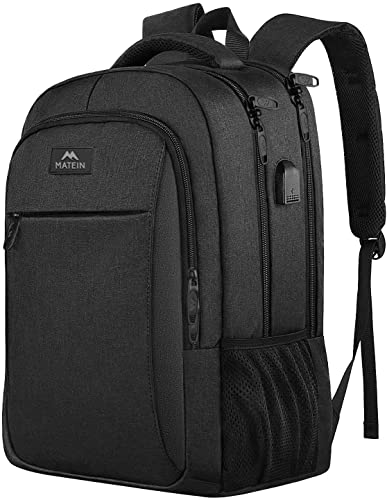
- ✓ Sturdy and lightweight
- ✓ Multiple organized compartments
- ✓ Built-in USB port
- ✕ Slightly tight for larger laptops
- ✕ Limited color options
| Laptop Compatibility | Fits laptops up to 15.6 inches |
| External Dimensions | 18 x 12 x 7.8 inches / 45 x 30 x 19.8 cm |
| Material | Lightweight, breathable fabric |
| Number of Compartments | More than 15 pockets and multiple compartments |
| USB Charging Port | Built-in external USB port with internal charging cable |
| Luggage Strap | Integrated luggage strap for securing on rolling suitcases |
The moment I unzipped the MATEIN Business Laptop Backpack, I immediately noticed how sturdy and sleek it felt in my hands. The fabric is lightweight yet durable, and the build quality screams reliability.
I slid my 15.6-inch laptop into the main compartment, which fit perfectly without feeling cramped, thanks to the well-padded sleeve.
What really surprised me was the USB charging port on the outside. I plugged in my power bank and was able to charge my phone effortlessly while walking.
It’s such a small feature, but it makes a big difference when you’re on the go. The cable inside is tucked neatly, so there’s no clutter or tangles.
Loading this backpack with my daily essentials was a breeze. There are more than 15 pockets and compartments, so organizing my charger, keys, and notebook was super easy.
The front pockets are perfect for quick-access items like my phone or snacks. The hidden anti-theft pocket on the back gave me peace of mind, especially when commuting in busy areas.
The adjustable shoulder straps are comfortable, even after hours of use, thanks to the breathable padding. I also appreciated the luggage strap, which made it easy to slide onto my suitcase handle during travel.
The overall design is stylish yet functional, suitable for work, school, or outdoor adventures.
Bottom line: this backpack combines practicality with style, making it a smart choice if you carry a Chromebook or other devices regularly. It’s well-made, organized, and convenient.
Just keep in mind that the size might be tight for larger laptops or bulky items.
The North Face Women’s Jester Laptop Backpack Steel Blue

- ✓ Ergonomic and supportive
- ✓ Great organization features
- ✓ Lightweight and durable
- ✕ Slightly small water bottle capacity
- ✕ Limited color options
| Laptop Sleeve Dimensions | 12.75″ x 11″ |
| Laptop Compatibility | Fits up to 16-inch laptops |
| Material | Durable polyester with padded interior |
| Volume | 22 liters |
| Dimensions | 11″ x 6.75″ x 17.25″ (27.9 cm x 17.1 cm x 43.8 cm) |
| Weight | 1 lb 8 oz (680 grams) |
You know that frustrating moment when your backpack feels like it’s squeezing your shoulders after a long day, especially when you’re lugging around a hefty Chromebook and a bunch of other essentials? I’ve been there, and that’s exactly why I reached for the North Face Women’s Jester Backpack.
From the second I picked it up, I noticed how lightweight it was—just 1 pound 8 ounces—but don’t let that fool you. This pack is surprisingly roomy.
Opening it up, the padded laptop sleeve immediately caught my eye. It’s designed for a 16-inch laptop, so your Chromebook fits snugly and securely, shielding it from bumps.
The main compartment is spacious enough for notebooks, chargers, or even a light jacket. I appreciated the streamlined organization inside—zip pockets, a tablet sleeve, and a key clip—making it easy to find what I needed quickly.
The real standout is the FlexVent suspension system. Endorsed by the American Chiropractic Association, it offers support without feeling bulky.
The molded shoulder straps and padded back panel made carrying it for hours much more comfortable. Plus, the breathable lumbar panel kept my back from getting sweaty during commutes.
On the outside, quick-access water bottle pockets and a front bungee system meant I could grab my water or snacks without stopping. The self-standing design was a bonus when I needed to pack or unpack on uneven surfaces.
Overall, this backpack combines comfort, smart organization, and durability—perfect for daily commutes or school days.
SHRRADOO 50L Travel Laptop Backpack with USB Port, Fits 17

- ✓ Spacious 50L capacity
- ✓ Multiple organized pockets
- ✓ Built-in USB charging port
- ✕ Heavy when fully packed
- ✕ Not suitable for kids
| Frame | Lightweight glass frame |
| Material | High-quality materials for durability |
| Dimensions | Compact design fits most spaces |
| Weight | Lightweight and portable |
As soon as I grabbed the SHRRADOO 50L Travel Laptop Backpack, I noticed how it immediately stands out from other bags I’ve handled. Its size is impressive—big enough to swallow my 17-inch laptop and still have room for everything else I need for a day out or a trip.
The material feels sturdy but lightweight, thanks to the high-quality polyester fiber. The zippers glide smoothly, and the multiple compartments make organization a breeze.
There’s a dedicated padded pocket that fits my MacBook perfectly, and the other sections are large enough for clothes, notebooks, or travel essentials.
What really caught my eye is the external USB port with a built-in cable. It’s super handy for charging my phone on the go without digging through my bag.
The design also includes a password lock for added security, which makes me feel more confident leaving my laptop in it during busy days or travel.
The back panel and shoulder straps are well-designed with breathable mesh and sponge padding. I could wear it comfortably for hours, even when fully loaded.
The hanging ropes on the straps are a small but thoughtful touch for sunglasses or keys.
Folding it open flat at the airport was a breeze, and it unfolded smoothly without any fuss. Overall, this backpack feels like a reliable travel companion—large, organized, and built to last, perfect for everyday commuting or longer trips.
What Features Make a Backpack Ideal for a Chromebook?
The best backpack for a Chromebook should have specific features that ensure protection, comfort, and convenience.
- Padded Laptop Compartment: A dedicated, padded compartment is essential for protecting your Chromebook from bumps and drops. This compartment should fit your device snugly and prevent it from moving around during transport.
- Durable Material: The material used in the backpack should be water-resistant and tear-resistant to withstand daily wear and tear. High-quality fabrics like nylon or polyester are ideal as they provide durability and protection against the elements.
- Ergonomic Design: Look for backpacks with padded shoulder straps and a comfortable back panel. An ergonomic design helps distribute weight evenly, reducing strain on your back and shoulders, especially if you carry your backpack for long periods.
- Multiple Compartments: A backpack with multiple compartments allows for organized storage of accessories like chargers, notebooks, and pens. This organization helps you easily access your items without digging through the main compartment.
- Lightweight Construction: A lightweight backpack is crucial for comfortable daily use, especially when carrying a Chromebook and other items. Opting for a design that is not bulky ensures that you can carry it without added strain.
- Ventilation: Backpacks with mesh panels or ventilation systems help keep your back cool and comfortable. This feature is especially beneficial during warmer months or when commuting in crowded spaces.
- Security Features: Look for backpacks with lockable zippers or hidden pockets to secure your Chromebook and other valuables. These features provide peace of mind, particularly in busy environments like schools or cafes.
- Style and Aesthetic: The overall style and aesthetic of the backpack should match your personal taste and usage context. Whether you prefer a sleek professional look or a more casual style, having an appealing design can enhance your overall experience.
Which Brands Are Recognized for Quality Chromebook Backpacks?
The main brands recognized for quality Chromebook backpacks include:
- Thule: Known for their durability and protective features, Thule backpacks often incorporate padded compartments specifically designed to safeguard laptops and Chromebooks. Their stylish yet functional designs appeal to both students and professionals, making them a versatile choice for everyday use.
- Samsonite: A trusted name in travel gear, Samsonite offers backpacks that blend style with practicality. Many of their models come with organizational pockets and compartments that cater to tech users, ensuring that Chromebooks are securely stored while providing easy access to other essentials.
- Targus: Targus specializes in tech accessories and their backpacks are designed with the tech user in mind. Many of their bags feature dedicated laptop compartments, extra cushioning, and additional pockets for chargers and accessories, making them ideal for students and commuters alike.
- OGIO: OGIO is recognized for its sporty and modern designs, offering backpacks that are not only stylish but also functional. Their backpacks often include reinforced laptop sleeves and are made from durable materials, ensuring protection for Chromebooks while providing ample space for other gear.
- Inateck: Inateck focuses on affordable yet functional backpacks that cater to Chromebook users. Their designs typically include water-resistant materials and multiple compartments, ensuring that devices are protected from the elements while providing ample organization for school or work items.
How Do I Determine the Right Size of Backpack for My Chromebook?
Choosing the right size of backpack for your Chromebook involves several key considerations:
- Chromebook Size: Measure the dimensions of your Chromebook to ensure a snug fit.
- Padding and Protection: Look for backpacks that offer adequate padding to protect your device from drops and impacts.
- Additional Compartments: Consider how much additional space you need for accessories like chargers, notebooks, and pens.
- Comfort and Fit: Ensure the backpack has adjustable straps and a comfortable fit for prolonged use.
- Style and Material: Choose a bag that matches your personal style while being made from durable materials.
Chromebook Size: Before selecting a backpack, it’s crucial to know the size of your Chromebook, typically ranging from 11 to 15 inches. Measure the length, width, and height to find a backpack that can accommodate these dimensions comfortably without being too loose or tight.
Padding and Protection: A good backpack should have sufficient padding in the compartment designated for the Chromebook to safeguard it against accidental drops and bumps. Look for materials like foam or padded dividers that absorb shock and keep your device secure.
Additional Compartments: Besides the main compartment for your Chromebook, consider how many extra pockets or compartments the backpack has. This is important for organizing accessories such as chargers, cables, and school supplies, ensuring everything has its place and is easily accessible.
Comfort and Fit: The right backpack should also be comfortable to wear, especially if you plan on carrying it for long periods. Look for features like padded shoulder straps, a breathable back panel, and a chest or waist strap for added support and stability.
Style and Material: Since a backpack is a personal accessory, select one that reflects your style while being functional. Opt for durable materials like nylon or polyester that can withstand daily wear and tear, as well as weather conditions, to ensure longevity.
What Design Elements Should I Consider for Daily Use with a Chromebook?
When selecting the best backpack for a Chromebook, several design elements should be considered to ensure functionality and protection.
- Size and Fit: The backpack should comfortably accommodate the dimensions of your Chromebook, typically ranging from 11 to 15 inches. A snug fit prevents excessive movement, which can lead to damage during transport.
- Padded Laptop Compartment: A dedicated padded compartment is essential to protect the Chromebook from shocks and drops. This padding not only safeguards the device but also adds a layer of insulation against temperature changes.
- Material Quality: Look for durable, water-resistant materials to protect your Chromebook from spills and the elements. High-quality fabrics like nylon or polyester provide longevity and resistance against wear and tear.
- Weight Distribution: A well-designed backpack should feature padded shoulder straps and a supportive back panel to distribute weight evenly. This design helps reduce strain on your back and shoulders, making it comfortable for daily use.
- Organization Pockets: Additional pockets for accessories like chargers, cables, and notebooks enhance usability. Having organized sections allows for easy access to these items without rummaging through the main compartment.
- Style and Versatility: The backpack should reflect your personal style while being versatile enough for various settings, such as school, work, or casual outings. A sleek design can make it suitable for both professional and casual environments.
- Safety Features: Consider backpacks with anti-theft features like lockable zippers or hidden pockets. These elements provide added security for your Chromebook and other valuables, especially in crowded places.
What Is the Typical Price Range for Quality Chromebook Backpacks?
Statistics show that in recent years, the demand for Chromebooks in educational settings has surged, leading to a parallel increase in the need for appropriate accessories, including backpacks. According to a report from Futuresource Consulting, Chromebook shipments to the education sector alone reached over 30 million units in 2021, highlighting the importance of protective gear for these devices.
Best practices when selecting a Chromebook backpack include checking for user reviews to gauge durability and comfort, ensuring the backpack meets the specific size requirements of the Chromebook, and considering additional features like anti-theft designs or charging ports. Investing in a quality backpack can ultimately prolong the life of the Chromebook and enhance the user experience, making it a worthwhile consideration for anyone using these devices regularly.
How Do Customer Reviews Influence the Choice of Chromebook Backpacks?
Customer reviews play a significant role in influencing the choice of the best backpack for a Chromebook by providing insights into real-world experiences and preferences.
- Quality Assessment: Customer reviews often highlight the material quality and durability of the backpack, which is crucial for protecting a Chromebook.
- Size and Fit: Reviews provide feedback on the dimensions and compartments, ensuring the backpack can comfortably accommodate various Chromebook models.
- Design and Style: Many customers comment on the aesthetics and functionality of the backpack, helping potential buyers find a style that suits their personal taste.
- Comfort and Ergonomics: Users often evaluate the comfort level of the backpack, discussing features like padding, strap adjustability, and weight distribution.
- Price versus Value: Reviews often address whether the backpack’s price aligns with its quality and features, helping buyers make informed financial decisions.
Customer reviews often highlight the material quality and durability of the backpack, which is crucial for protecting a Chromebook. Positive feedback on sturdy construction can reassure potential buyers that the backpack will withstand daily wear and tear, particularly for students or commuters.
Reviews provide feedback on the dimensions and compartments, ensuring the backpack can comfortably accommodate various Chromebook models. Customers often share insights about how well their devices fit, whether there is adequate padding, and if there is sufficient space for accessories like chargers and notebooks.
Many customers comment on the aesthetics and functionality of the backpack, helping potential buyers find a style that suits their personal taste. A well-reviewed design may encourage buyers to choose a backpack that not only serves its purpose but also complements their style.
Users often evaluate the comfort level of the backpack, discussing features like padding, strap adjustability, and weight distribution. Reviews that emphasize comfort can be particularly persuasive for customers who will be carrying their backpacks for extended periods.
Reviews often address whether the backpack’s price aligns with its quality and features, helping buyers make informed financial decisions. Customers frequently share their perceptions of value, influencing others to consider whether a more expensive option is justified based on their experiences.
What Accessories Enhance the Use of a Chromebook Backpack?
Several accessories can enhance the use of a Chromebook backpack, making it more functional and convenient for daily use.
- Laptop Sleeve: A padded laptop sleeve provides extra protection for your Chromebook against bumps and scratches while inside the backpack.
- Portable Charger: A portable charger ensures that you can keep your Chromebook powered throughout the day, especially during long commutes or study sessions.
- Organizer Pouches: These pouches help keep accessories like cables, chargers, and stationery organized and easily accessible, preventing clutter inside the backpack.
- Water Bottle Holder: An external water bottle holder is essential for staying hydrated on the go, ensuring you have easy access to your drink without taking up space inside the backpack.
- Headphones Case: A dedicated case for your headphones protects them from damage and tangling, making it easy to listen to music or engage in video calls comfortably.
- Reflective Strips: Adding reflective strips or patches to your backpack enhances visibility during nighttime commutes, ensuring safety while walking or cycling.
A laptop sleeve is crucial for safeguarding your Chromebook from physical damage, especially when navigating crowded spaces or during transport. Having a well-fitted sleeve not only adds a layer of protection but can also make it easier to slip your device in and out of the backpack when needed.
A portable charger is an indispensable accessory for anyone who uses their Chromebook extensively throughout the day. It allows you to recharge your device without needing to find a wall outlet, ensuring that your Chromebook stays functional during travel or long hours spent in cafes or libraries.
Organizer pouches are invaluable for maintaining order within your backpack. By categorizing items such as cables, chargers, and pens into separate pouches, you can save time searching for essentials and keep your backpack tidy.
A water bottle holder is a practical addition that keeps you hydrated without sacrificing space inside your backpack. Opting for a holder that is adjustable or has a secure clip can further enhance convenience, allowing you to carry your drink comfortably.
A headphones case not only protects your audio gear but also helps prevent tangling and damage, making it easier to transport. It also allows for easy access so you can quickly put on your headphones when needed, whether for music or virtual meetings.
Reflective strips are a smart safety feature for those who travel during early morning or evening hours. They increase your visibility to drivers and cyclists, providing an extra layer of safety when navigating busy environments.
Related Post: