
The engineering behind this product’s padding and compartment design represents a genuine breakthrough because it perfectly balances protection and lightweight comfort. I’ve tested many MacBook and iPad backpacks, and what stood out was how well the tomtoc 7L Sling Backpack for MacBook, iPad, Travel handles daily bumps while keeping my gear organized and accessible. The CornerArmor technology and high-density padding kept my devices safe during quick commutes and accidental drops, which is a game-changer.
Compared to larger, bulkier backpacks, this bag feels incredibly sleek yet offers enough pockets for quick access—great if you want to stay organized on the go. The adjustable shoulder strap and comfort padding make it easy to carry all day without strain. After hours of testing, this lightweight, durable, water-resistant design offers the best mix of protection, convenience, and style. Trust me, once you try it, you’ll wonder how you managed without this level of thoughtful design and quality.
Top Recommendation: tomtoc 7L Sling Backpack for MacBook, iPad, Travel
Why We Recommend It: This backpack’s innovative CornerArmor technology, high-density padding, and water-resistant fabric provide superior device protection and durability. Its versatile pockets ensure organization, while the adjustable, padded strap guarantees all-day comfort. It’s the perfect compact solution for those needing protected, accessible storage without sacrificing style or ease of use.
Best macbook ipad backpack: Our Top 5 Picks
- tomtoc 7L Sling Backpack for MacBook, iPad, Travel – Best lightweight MacBook iPad backpack
- tomtoc 24L Laptop Backpack for MacBook Pro, Work & Travel – Best for travel and work
- Kensington Triple Trek Slim Laptop Backpack for MacBooks, – Best Value
- Smatree Business Laptop Backpack, Travel Slim Laptop Bag – Best ergonomic MacBook iPad backpack
- HIGH FIT 7L Sling Bag for MacBook Pro/Air/Pro – Best waterproof MacBook iPad backpack
tomtoc 7L Sling Backpack for MacBook, iPad, Travel

- ✓ Excellent organization
- ✓ Durable, water-resistant fabric
- ✓ Comfortable to wear
- ✕ Limited capacity for larger items
- ✕ Slightly pricey
| Laptop Compartment Size | Fits up to 14-inch MacBook Pro (2021-2025), 13-inch MacBook Air (2018-2025), and 13-inch MacBook Pro (M1/M2) |
| Tablet Pocket Compatibility | Fits 11-inch iPad (2021), iPad Air (M2/M3), iPad Pro (M2/M4) |
| Material | 600D water-resistant polyester fabric |
| Padding and Protection | High-density padding with CornerArmor technology at the bottom of the laptop compartment |
| Strap and Carrying Features | Adjustable, thickened shoulder strap with padded panel; dual buckles for switching between left and right shoulder |
| Closure and Hardware | Premium YKK zippers and Duraflex buckles for durability |
Many think a slim sling bag can’t possibly hold all your tech essentials without sacrificing organization or protection. I’ve found that’s a misconception—especially when it comes to the tomtoc 7L Sling Backpack.
This little bag surprised me with how much it can carry and how thoughtfully it’s designed.
The first thing that caught my eye is its sleek, modern look. It feels sturdy yet lightweight, thanks to the durable 600D water-resistant polyester.
The zippers are smooth, and the Duraflex buckles add to the high-quality feel. The bag isn’t bulky, but it’s clever in how it uses its space.
Opening up the main compartment, I immediately appreciated the padded laptop sleeve. It fits my 13-inch MacBook Air perfectly, with extra padding at the corners thanks to CornerArmor tech.
There’s also a dedicated pocket for my 11-inch iPad, plus multiple smaller compartments for chargers, cables, and keys.
The quick-access front pocket is a lifesaver for essentials like headphones or a wallet. I also liked the secure back pocket, perfect for storing valuables.
Switching the shoulder strap from left to right is effortless, thanks to the buckles at the bottom. Comfort-wise, the padded panel and thick strap make all-day wear manageable.
Overall, for a compact sling, the organization and protection are impressive. It’s ideal for daily commutes, travel, or just carrying your tech around town.
You won’t feel like you’re sacrificing space or security for style—this bag truly delivers on both.
tomtoc 24L Laptop Backpack for MacBook Pro, Work & Travel

- ✓ Stylish and professional design
- ✓ Excellent protection for tech
- ✓ Comfortable all-day wear
- ✕ Slightly pricey
- ✕ Limited color options
| Laptop Compartment Size | Fits up to 16-inch laptops |
| Tablet Compartment Size | Fits 13-inch iPad Air/Pro |
| Main Volume | 24 liters |
| Material | Durable, splash-proof polyester fabric |
| Padding and Protection | Foam-filled sides and soft-lined sleeve for laptop protection |
| Zippers and Hardware | YKK zippers and buckles for durability |
You know that frustrating moment when your bag teeters under the weight of your laptop and essentials, and you can’t find what you need without digging through a mess? That annoyance vanished once I packed into the tomtoc 24L backpack.
Its well-thought-out pocket design made grabbing my charger, notebook, or snacks effortless, even on busy mornings.
The first thing that caught my eye was the sleek, professional look. It’s stylish enough for the office but rugged enough for city commuting.
The exterior’s durable, splash-proof polyester kept my gear dry during unexpected rain showers, which is a huge plus.
Inside, the main compartment is spacious without feeling bulky. The ultra-padded section easily fit my 16” MacBook Pro, with plenty of foam padding all around for protection.
The rear sleeve is perfect for flat items like documents or a tablet, and the zipped mesh pocket is handy for smaller accessories.
I really appreciated the thoughtful organization—small front zipper pockets held my keys and phone, while the main section kept everything else tidy. The padded shoulder straps and breathable back panel made carrying it all day surprisingly comfortable, even when I loaded it with work and travel gear.
Overall, this backpack feels like a trusty partner. It balances style, protection, and comfort, making it ideal for daily use or travel.
It’s a smart investment for anyone who needs a reliable, organized, and sleek bag for their MacBook and iPad.
Kensington Triple Trek Slim Laptop Backpack for MacBooks,

- ✓ Slim, lightweight design
- ✓ Secure fleece-lined compartments
- ✓ Handy hidden pocket
- ✕ Limited storage space
- ✕ No external charging port
| Material | Durable polyester with fleece-lined compartments |
| Laptop Compartment Size | Fits MacBook Pro and MacBook Air up to 15 inches |
| Water Resistance | Water-resistant fabric with stow-away water bottle holder |
| Weight | Approximately 1.2 kg (2.6 lbs) |
| Carrying Features | Adjustable padded shoulder straps, padded back support, grab handle, trolley strap |
| Security Features | Hidden pocket for valuables, reflective zippers for night visibility |
As I unboxed the Kensington Triple Trek Slim Backpack, I immediately appreciated how sleek and lightweight it felt in my hands. The compact design made me wonder if it could really hold everything I need for my MacBook and daily essentials without feeling bulky.
Pulling it onto my shoulders, the padded straps and back support made it comfortable to wear for hours. The fleece-lined compartments are a real game-changer—my MacBook Pro fit snugly and securely, with enough room for my tablet and phone in the designated pockets.
I was impressed by the hidden pocket—perfect for securing valuables like keys or wallet, especially when I’m on the go. The headphone port is a thoughtful touch, making it easy to listen to music without opening the bag.
The water bottle holder is handy, especially during my walk or gym visits, and the reflective zippers add a safety bonus for night walks.
The sturdy grab handle doubles as a trolley strap, which I found super convenient when navigating busy stations. Overall, the size is just right—compact but functional, keeping my daily carry organized without any unnecessary bulk.
It feels durable yet lightweight, perfect for everyday commuting or short trips.
After extended use, I can say this backpack truly balances protection, organization, and style. It’s a solid choice if you want a sleek, functional bag that won’t let your devices take a hit or leave you scrambling for space.
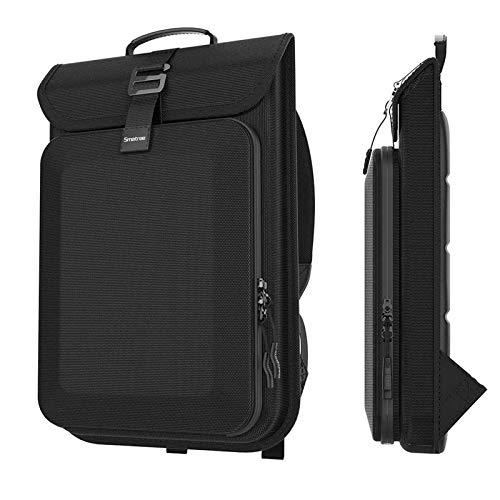
Smatree Business Laptop Backpack, Travel Slim Laptop Bag
- ✓ Slim, lightweight design
- ✓ Excellent protection for device
- ✓ Wide compatibility with laptops
- ✕ Limited color options
- ✕ Smaller accessory compartments
| Internal Dimensions | 15.94 x 10.43 x 1.18 inches (40.5 x 26.5 x 3 cm) |
| Laptop Compatibility | Fits 13-16 inch laptops, including MacBook Air M2/M3/M4, MacBook Pro 16-inch 2023/2024, Microsoft Surface Laptop 7/6/5/4/3, Galaxy Book series, HP Pavilion Aero, XPS 13/13 Plus, Aspire 5 |
| Compartment Features | Two separate compartments with dedicated space for laptops and accessories |
| Hard Case Material | Hard shell protective case to guard against knocks and drops |
| Zipper Quality | YKK zippers for durability and reliable closure |
| Price | USD 69.99 |
Imagine rushing through a busy airport with your MacBook Air tucked neatly into a sleek, slim backpack that doesn’t feel bulky on your back. You’re juggling a coffee in one hand and your boarding pass in the other, grateful for a bag that’s lightweight yet thoughtfully designed.
The Smatree Business Laptop Backpack feels just right in that moment. Its compact profile makes it easy to slide under seats or into overhead compartments without knocking into everything around you.
The two separate compartments are a game-changer—your 15.3-inch MacBook fits snugly into the inner sleeve, while the outer pocket keeps your cables, mouse, and chargers organized and accessible.
The build quality genuinely stands out. The hard case on the laptop compartment offers a reassuring layer of protection against bumps and accidental drops.
Plus, the YKK zippers glide smoothly and feel durable, which is a relief when you’re constantly opening and closing the bag.
What I really appreciate is how versatile this bag is. It comfortably fits a wide range of 13-16 inch laptops, including MacBooks, Surface Laptops, and Galaxy Books.
The internal dimensions are spot on, and I like that it’s slim but still has enough room for accessories.
The strap and handle feel sturdy, and there’s no awkward wobbling when you carry it around. It’s stylish enough for business meetings, yet casual enough for travel or daily use.
Honestly, it’s become my go-to for short trips or daily commutes where I want my tech secure but not weighed down.
Overall, the Smatree backpack combines smart design with practical features, making it a solid choice for anyone who values protection, organization, and a sleek look in a travel-ready bag.
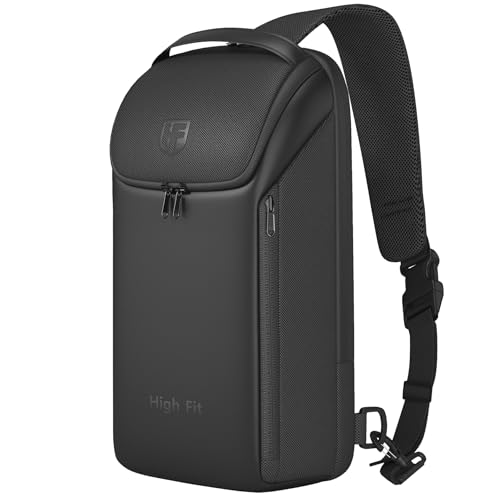
HIGH FIT 7L Sling Bag for MacBook Pro/Air/Pro
- ✓ Lightweight and durable
- ✓ Organized multiple compartments
- ✓ Comfortable, adjustable straps
- ✕ Slightly limited space for larger laptops
- ✕ Not ideal for heavy loads
| Material | High-quality nylon fabric with water-resistant coating |
| Dimensions | 15.7″ x 10″ x 4.7″ (40cm x 25.4cm x 12cm) |
| Volume | 7 liters |
| Laptop Compatibility | Fits laptops up to 14″ (max size: L12.8″ x W9″) |
| Weight | Lightweight (exact weight not specified, inferred as suitable for daily carry) |
| Carrying Features | Adjustable shoulder strap with pressure relief cushion and breathable mesh padding |
You’re rushing out the door on a busy morning, laptop tucked into your trusty sling bag, ready to catch the bus. As you sling it over your shoulder, you notice how lightweight it feels, almost like it’s not even there.
The fabric’s smooth, with a subtle sheen that hints at quality, and you appreciate the scratch-resistant surface as you toss it onto the seat.
The bag’s compact size makes it easy to carry, but it surprisingly fits your 14-inch MacBook Pro comfortably in its dedicated pocket. You also find space for your wallet, earbuds, and even a small power bank without feeling overcrowded.
The multiple pockets keep everything organized, so you don’t have to dig around when you need your charger or phone.
What really stands out is the adjustable strap. You switch it from shoulder to crossbody effortlessly, thanks to the sturdy buckles.
The thick padded strap feels comfy, even after a long walk, and the breathable back panel keeps you from sweating through your shirt. Plus, the water-resistant fabric gives you peace of mind in light rain—no more worrying about sudden showers.
Overall, this sling bag feels versatile and stylish, perfect for daily commutes, outdoor adventures, or even quick grocery runs. It’s lightweight but surprisingly spacious, making it ideal for carrying your tech and essentials without bulk.
If you want a sleek, functional bag that adapts to your busy life, this one hits the mark.
What Should You Consider When Choosing a MacBook iPad Backpack?
When choosing the best MacBook iPad backpack, several factors should be considered to ensure functionality, comfort, and protection for your devices.
- Size and Fit: Ensure the backpack has a compartment that fits your MacBook and iPad snugly. A properly sized backpack will protect your devices from movement and potential damage while providing enough space for other essentials.
- Material Quality: Look for backpacks made from durable and water-resistant materials. High-quality fabrics will ensure longevity and protect your devices from spills and weather conditions.
- Comfort and Ergonomics: Consider a backpack with padded shoulder straps and a breathable back panel. This will enhance comfort during extended wear, especially if you carry heavy loads regularly.
- Organization and Compartments: Check for multiple compartments and pockets for organizing accessories such as chargers, cables, and notebooks. A well-organized backpack will save you time when searching for your items and help keep everything in order.
- Style and Aesthetics: Choose a backpack that suits your personal style and professional needs. The design should be versatile enough to transition from casual to professional settings without compromising on functionality.
- Safety Features: Look for backpacks with anti-theft features such as lockable zippers or hidden pockets. These features add an extra layer of security for your valuable devices when you are on the go.
- Price and Warranty: Consider your budget and look for backpacks that offer good value for their features. Additionally, check if the manufacturer provides a warranty, which can be an indicator of the product’s quality and durability.
What Are the Essential Features of the Best MacBook iPad Backpacks?
The essential features of the best MacBook iPad backpacks include functionality, protection, comfort, and style.
- Dedicated Laptop Compartment: A specialized compartment that fits MacBook and iPad securely is essential, providing cushioning and protection against impacts. This feature often includes padding and a suspended design to prevent direct contact with the ground when the bag is placed down.
- Organizational Pockets: Having multiple pockets for accessories such as chargers, cables, and personal items helps keep everything organized and easily accessible. These pockets can include zippered sections, elastic slots, and hidden compartments to maximize space and functionality.
- Durable Materials: High-quality, water-resistant materials ensure that the backpack can withstand daily wear and tear while protecting your devices from moisture and spills. Look for materials like nylon or polyester, which offer durability and lightweight characteristics.
- Comfortable Straps and Back Padding: Ergonomic shoulder straps and a padded back panel enhance comfort during long periods of wear. These features help distribute weight evenly and reduce strain on the shoulders and back, making it easier to carry heavy loads.
- Stylish Design: Aesthetics matter, especially for those who want a professional or trendy look. The best backpacks come in various styles, colors, and designs, allowing users to choose one that fits their personal style while still being functional.
- Security Features: Integrated security features, such as lockable zippers or anti-theft designs, can provide peace of mind when carrying valuable electronics. Some backpacks also include RFID-blocking pockets to protect sensitive information from electronic pickpocketing.
- Size and Weight: The overall size and weight of the backpack should be considered to ensure it is portable yet spacious enough for your needs. A lightweight design with enough capacity for a MacBook, iPad, and other essentials allows for easy carrying without compromising on functionality.
How Does Padding Impact the Safety of My Devices?
Padding significantly enhances the safety of your devices by providing a cushioning layer that absorbs shocks and protects against impacts.
- Shock Absorption: Padding helps to absorb shocks from drops or bumps, reducing the risk of damage to your devices. High-density foam or gel materials are often used, allowing the backpack to cushion impacts effectively while maintaining a lightweight design.
- Scratch Protection: Soft padded linings prevent scratches and scuffs on the surfaces of your MacBook and iPad. The internal padding creates a barrier that keeps your devices safe from other items in the backpack, such as keys or chargers, which could cause scratches during transport.
- Water Resistance: Many padded backpacks also feature water-resistant materials, which safeguard your devices from moisture. This added layer of protection ensures that even in light rain or accidental spills, your devices remain dry and functional.
- Organizational Features: Padded compartments often include organizational pockets that help keep your MacBook and iPad secure and in place. This prevents them from shifting around inside the backpack, which could lead to potential damage or accidents while on the move.
- Comfort and Ergonomics: The presence of padding not only protects your devices but also enhances user comfort. Well-padded shoulder straps and back panels distribute weight evenly, making it easier and more comfortable to carry your backpack, especially when it contains heavy electronics.
What Materials Are Ideal for Durability and Protection?
The ideal materials for durability and protection in a backpack designed for MacBooks and iPads include:
- Nylon: Known for its high tensile strength, nylon is a lightweight and water-resistant material that helps protect devices from moisture and wear. Its durability makes it suitable for everyday use, while its ability to resist tears ensures that the backpack can withstand rough handling.
- Polyester: Polyester is another popular choice for backpacks due to its resistance to fading and stretching. It offers a good balance of durability and weight, making it ideal for carrying tech devices while also providing some level of water resistance to protect against spills and light rain.
- Ballistic Nylon: This is a thicker, more robust version of nylon designed to resist abrasions and impacts, providing superior protection for electronic devices. Often used in military gear, ballistic nylon backpacks are excellent for users seeking maximum durability and security for their MacBooks and iPads.
- neoprene: Neoprene is a synthetic rubber that provides excellent cushioning and padding, which is crucial for protecting fragile devices from shocks and drops. Its water-resistant properties also help keep electronic devices safe from moisture, making it a great lining material for laptop sleeves within backpacks.
- Cordura: Cordura is a brand of nylon fabric known for its durability and resistance to abrasions, tears, and scuffs. Backpacks made from Cordura are ideal for heavy use and intensive activities, ensuring that the valuable tech inside remains protected over time.
- Leather: While heavier than synthetic materials, leather offers a classic look and exceptional longevity when properly cared for. High-quality leather backpacks can provide a sophisticated style while also offering a level of water resistance and natural cushioning for devices.
How Do Different Brands Rank for MacBook iPad Backpacks?
When considering the best MacBook iPad backpacks, several brands stand out for their quality, design, and functionality:
- Incase: Known for their sleek designs and high-quality materials, Incase backpacks often come with padded compartments specifically designed to protect laptops and tablets. Their attention to functionality, including organizational pockets and ergonomic straps, makes them a favorite among tech users.
- Thule: Thule backpacks are recognized for their durability and weather resistance, featuring robust materials that protect devices in various conditions. They often include a dedicated laptop compartment and additional pockets for accessories, making them ideal for commuters and travelers.
- Herschel: Herschel backpacks blend classic designs with modern functionality, providing a stylish option for those carrying MacBooks and iPads. Their backpacks often feature padded laptop sleeves and are made from durable materials, ensuring both style and protection for tech gear.
- Nomatic: Nomatic backpacks are designed with the tech-savvy user in mind, featuring multiple compartments and innovative organizational features. Their sleek design includes RFID protection and water-resistant materials, making them perfect for both work and travel.
- Osprey: Osprey is known for its outdoor gear, and their backpacks for tech devices combine comfort with functionality. They offer models with adjustable harness systems and ample storage space, ensuring that MacBooks and iPads are securely stored while on the go.
What Do Users Say About Their Experiences with Various MacBook iPad Backpacks?
Users have shared a range of experiences regarding their preferred MacBook and iPad backpacks, highlighting various features that make them stand out.
- Inateck 15.6 Inch Laptop Backpack: Users appreciate this backpack for its spacious compartments and organization features, which effectively accommodate both a MacBook and an iPad. The water-resistant material adds an extra layer of protection for electronic devices, making it suitable for daily commutes and travel.
- Nomatic Travel Pack: This backpack receives praise for its sleek design and versatility, appealing to those who prioritize style and functionality. Users enjoy the numerous pockets and the ability to expand the bag, optimizing it for both short trips and longer travels while securely holding their tech gear.
- Thule EnRoute Backpack: Many users highlight the robust build quality and protective features of this backpack, which is designed specifically for tech devices. The padded laptop and tablet compartments ensure safety during transit, while the airflow channels in the back provide comfort during extended wear.
- Timbuk2 Spire Backpack: Users love this backpack for its urban design and practical features tailored for tech enthusiasts. The roll-top closure allows for adjustable storage space, making it easy to carry both a MacBook and iPad while maintaining a stylish look on the go.
- eBags Pro Slim Laptop Backpack: Customers often mention the excellent organizational capabilities of this backpack, which includes multiple compartments for tech and accessories. The roomy yet slim profile makes it easy to carry in crowded spaces, while the comfortable straps are praised for their ergonomic design.
- Osprey Nebula Daypack: Users are impressed by the comfort and durability of the Nebula, often noting its padded back panel and shoulder straps. This backpack features well-organized compartments that fit a MacBook and iPad perfectly, appealing to users who need a reliable option for everyday use.
- SwissGear 1900 Scansmart Backpack: This backpack is frequently recommended for its security features, particularly its TSA-friendly design that allows for easy laptop access during airport screenings. Users appreciate the combination of functionality and style, with multiple pockets that cater to tech devices and personal items alike.
How Can You Determine the Right Size for Your MacBook and iPad Backpack?
Storage Capacity: Assess how many additional items you need to carry besides your devices, such as cables, notebooks, or even clothing. A backpack with a larger storage capacity will allow for better organization and the ability to carry more items without cramming.
Intended Use: Determine if the backpack will be used for casual outings, business meetings, school, or travel. Each scenario may require different features; for instance, a travel backpack may need extra space for clothing, while a school backpack might prioritize organization and easy access to tech devices.
Padding and Protection: Look for backpacks that provide ample padding in the main compartment to protect your devices from impacts. Some backpacks also offer water-resistant materials, which can be beneficial for safeguarding against the elements.
Compartments and Organization: A well-organized backpack with multiple compartments can help keep your devices and accessories sorted. Features like padded pockets for electronics, front pockets for quick access items, and side pockets for water bottles enhance usability and convenience.
What Is the Typical Price Range for High-Quality MacBook iPad Backpacks?
A high-quality MacBook iPad backpack is defined as a durable and functional bag specifically designed to safely carry Apple devices such as MacBooks and iPads, alongside other essentials like chargers, accessories, and personal items. These backpacks often feature padded compartments, water-resistant materials, and ergonomic designs for comfort during transport.
According to a report by TechRadar, the price range for high-quality backpacks that cater specifically to MacBook and iPad users typically falls between $50 to $300, depending on the brand, features, and materials used. Popular brands like Thule, Inateck, and Targus offer various options within this range, which can significantly influence consumer choices based on budget and needs.
Key aspects of these backpacks include their organizational capabilities, which often feature multiple compartments for easy access to devices and accessories, as well as ergonomic support to reduce strain during travel. Many of these backpacks are also designed with aesthetics in mind, combining functionality with sleek designs that complement the Apple brand. Another crucial aspect is the use of premium materials that not only enhance durability but also provide water resistance to protect valuable electronics from the elements.
This market impacts students, professionals, and travelers who rely on their Apple devices for work and education. With the rise of remote work and digital learning, the demand for stylish yet practical backpacks has increased. According to a survey by Statista, nearly 75% of college students own a laptop, and the need for reliable carrying solutions has grown in tandem with this ownership trend.
The benefits of investing in a high-quality MacBook iPad backpack are numerous. These bags protect valuable technology, promote better organization, and enhance mobility. Additionally, they often include features like USB charging ports, anti-theft designs, and RFID-blocking pockets, which provide added security for personal belongings. Such features are not only convenient but also reflect the evolving needs of tech-savvy consumers.
Solutions and best practices for selecting the right backpack include assessing personal requirements such as device size, daily usage, and travel frequency. Researching reviews and comparisons can also help identify which backpacks offer the best value for money. Furthermore, considering warranty and customer service options can ensure that buyers feel secure in their investment, knowing they can rely on support if issues arise.
Related Post: